RemindMe pins your most important note to your Lock Screen, so it’s there every time you pick up your phone. Built for ADHD — not another to-do list.
Free 3-day trial · iPhone · iOS 18+
Sound familiar?
You’re not the only one who forgets.
Out of sight, out of mind.
If a task isn’t in front of you, it quietly stops existing. That’s not a character flaw — it’s how a lot of brains work.
The unlock trap.
You unlock your phone to check your list, see a notification… and forget why you picked it up.
To-do app fatigue.
Another app you have to remember to open is just another thing to forget.
How it works
From thought to Lock Screen in seconds.
1
Type it.
Open RemindMe and start typing. The keyboard’s already up — no menus, no setup.
2
Pin it.
Tap the pin. Your note or checklist goes straight to your Lock Screen.
3
See it. Tick it off.
It’s there every time you glance at your phone. Check items off without unlocking.
Features
One small app. One job. Done well.
Everything in RemindMe exists to keep the right thing in front of you — and nothing else.
Lock Screen
Your note lives on your Lock Screen.
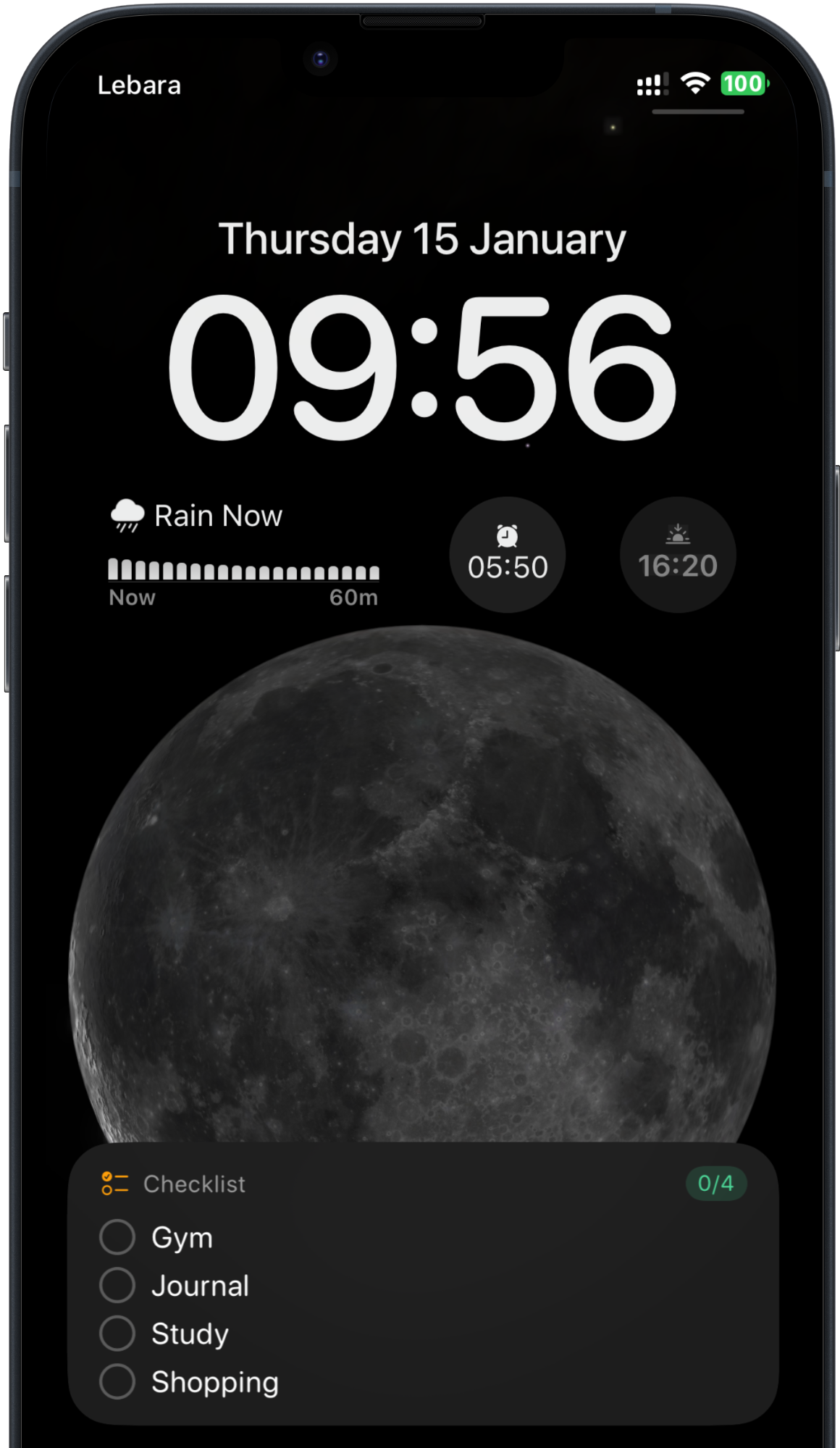
Pin a memo or a checklist and it stays on your Lock Screen and in the Dynamic Island — visible every time you glance at your phone, no unlocking needed.
Tick off checklist items right from the Lock Screen
Live progress, like 2 of 4 done
Matches the theme you choose
Capture
Catch the thought before it’s gone.
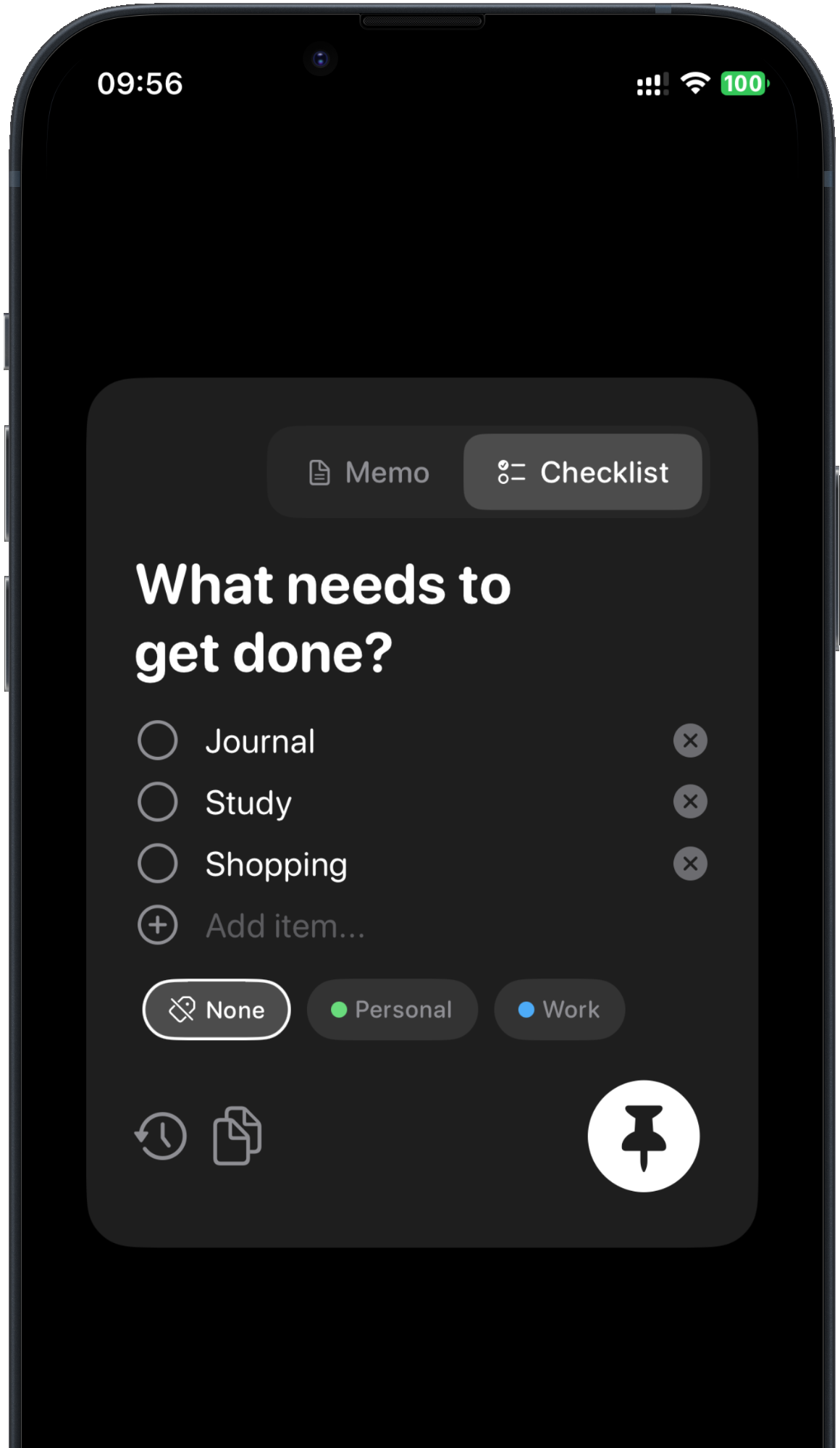
RemindMe opens with the keyboard already up. Type a quick memo or a checklist, add a label if you like, and tap the pin.
Switch between Memo and Checklist
Color-coded labels, like Personal and Work
Pin it in one tap
Reminders
Reminders that won’t let you forget.
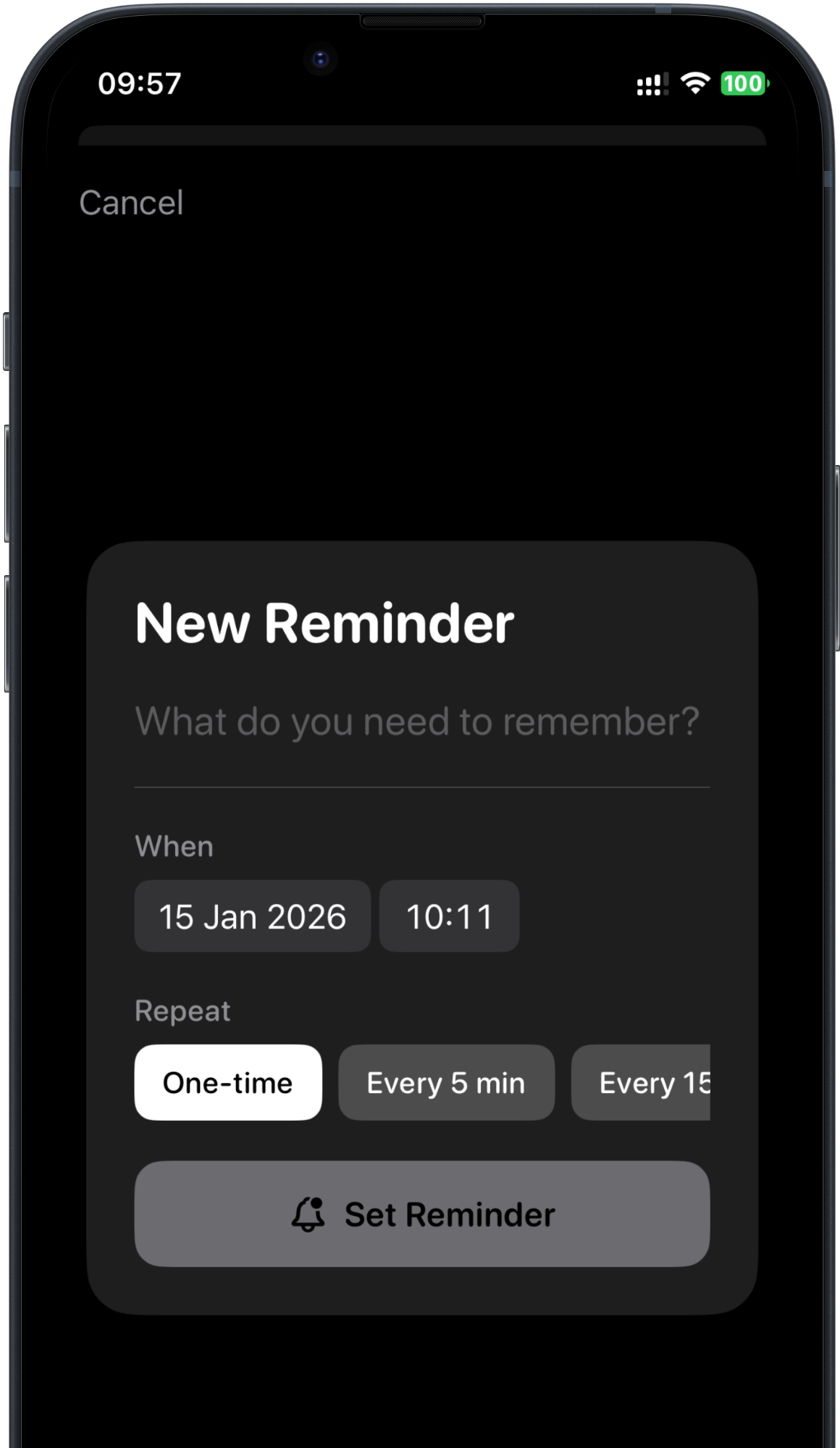
For the things you truly can’t miss — meds, a deadline, a call back. Repeating reminders keep nudging you until you mark them done.
Repeat every 5, 15 or 30 minutes, every hour, every 2 hours, or daily
One-time reminders for a specific date and time
You’re in control — turn them off anytime
History
Never lose a thought.
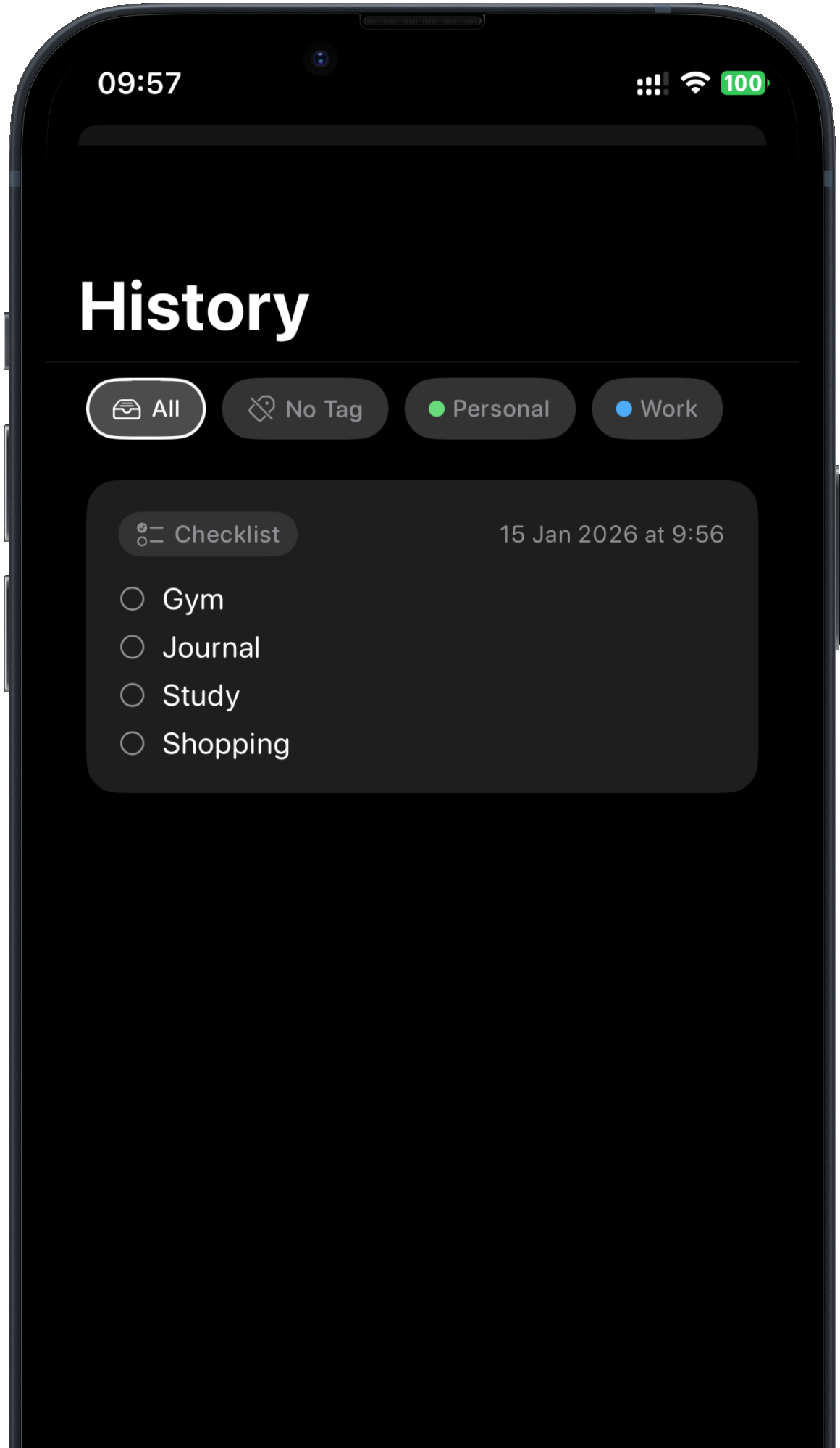
Every note you pin is saved. Filter by label, find what you were thinking about earlier, and pin it again with one tap.
Every pinned note and checklist, in one place
Filter by label
Re-pin in one tap
Templates & labels
Routines on repeat.
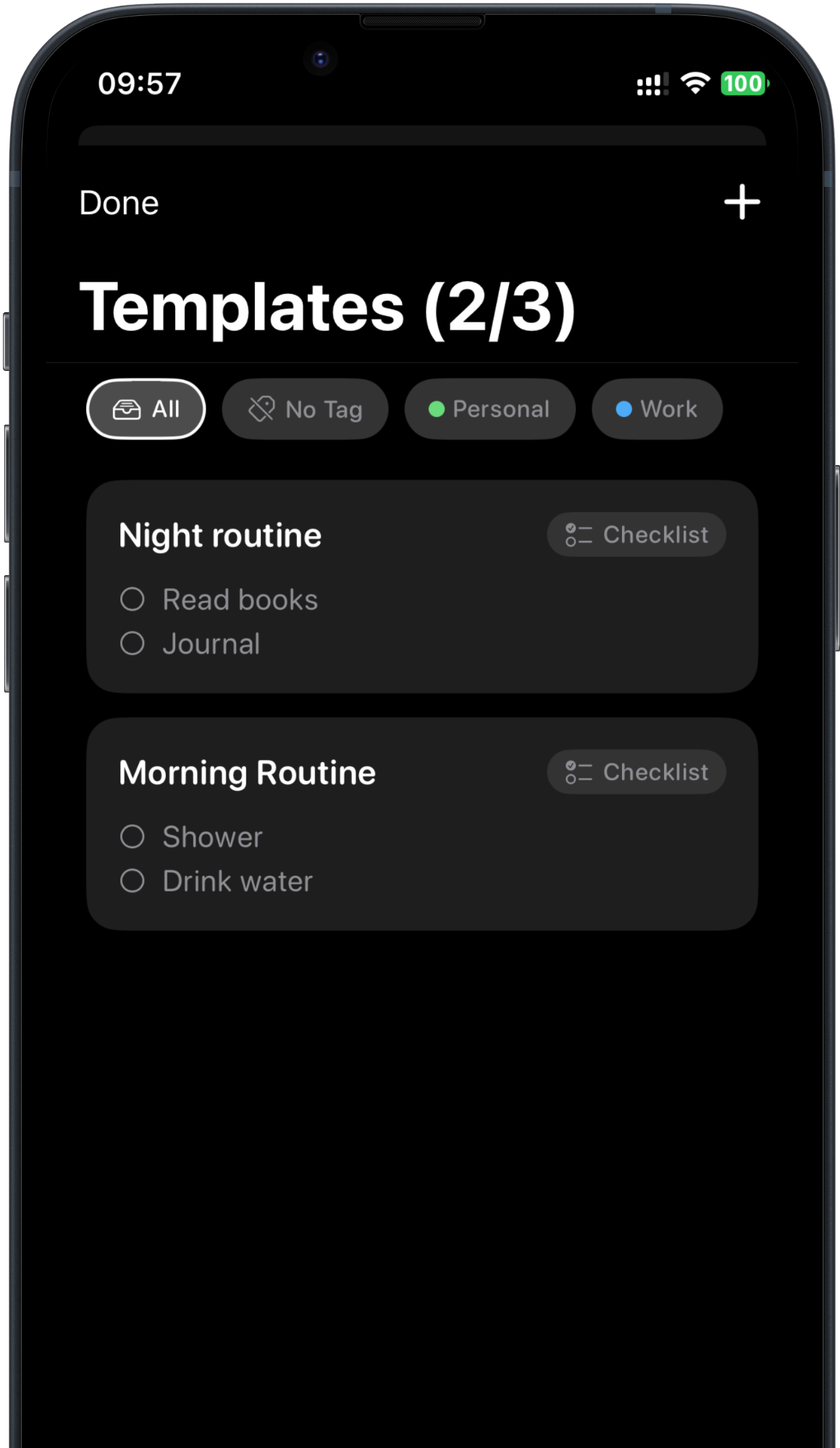
Save the lists you use again and again — a morning routine, a night routine, a packing list — and pin them in seconds.
Memo and checklist templates
Organize everything with color-coded labels
Start your day without retyping
And more
The little things that make it stick.
Dynamic Island
Your pinned note also lives in the Dynamic Island on iPhones that have one.
Home Screen widgets
Memo, an interactive Checklist, Reminders and Quick Capture.
Lock Screen widgets
Memo, a countdown to your next Reminder, and a progress Status.
Four themes
System, Dark, Light — and Sweet, a soft pastel pink.
Haptic feedback
A satisfying tap when you pin a note and when you finish one.
VoiceOver support
Designed to work with VoiceOver from the first screen.
Six languages
English, Turkish, German, Spanish, French and Japanese.
Private by design
No account. Your notes stay on your iPhone.
Privacy
Your notes stay on your iPhone.
No account. No sign-up. Nothing to sync. What you write in RemindMe is stored on your device — and deleting the app deletes it.
Notes, checklists and reminders are stored only on your device
Anonymous usage statistics help us improve the app
Pricing
Simple pricing. Everything included.
New subscribers start with a free 3-day trial. Every plan unlocks everything in RemindMe.
Monthly
$4.99/ month
Flexible. Cancel anytime.
Yearly
Best value · save 33%
$39.99/ year
Just $3.33 a month, billed yearly.
Lifetime
$69.99one-time
Pay once, keep it forever.
Every plan includes
Lock Screen notes & checklists
Repeating reminders
Unlimited history
Unlimited templates & labels
All four themes, including Sweet
Every widget
Prices in USD. Local pricing is shown in the App Store.
Payment is charged to your Apple ID. A free trial, where offered, converts to a paid subscription unless you cancel at least 24 hours before it ends. Subscriptions renew automatically unless canceled at least 24 hours before the end of the current period. Manage or cancel anytime in Settings → [your name] → Subscriptions.
No. Your note sits on your Lock Screen — and in the Dynamic Island on iPhones that have one — as a Live Activity. You can even tick off checklist items right there.
How long does a pinned note stay on my Lock Screen?
iOS lets a Live Activity stay active for up to 8 hours, and it can remain visible on the Lock Screen for up to 4 more hours after that. When it’s gone, re-pin it from History with one tap.
Which devices are supported?
RemindMe is designed for iPhone and needs iOS 18 or later. The Dynamic Island view appears on iPhones that have one.
Is RemindMe only for people with ADHD?
It’s designed around ADHD brains, but it helps anyone who forgets things once they’re out of sight — students, parents, busy professionals.
How much does it cost?
RemindMe is free to download, and new subscribers get a free 3-day trial. After that, choose Monthly ($4.99), Yearly ($39.99) or a one-time Lifetime purchase ($69.99). Prices are in USD; your local price is shown in the App Store.
How do I cancel or restore a purchase?
Subscriptions are managed by Apple: open Settings → [your name] → Subscriptions → RemindMe to cancel. Reinstalled the app or got a new iPhone? Tap Restore Purchases in RemindMe.
Where are my notes stored?
Only on your iPhone. There’s no account and no cloud sync, so your notes never leave your device. Deleting the app deletes your notes.
My note isn’t showing on the Lock Screen. What should I do?
Open Settings → RemindMe and make sure Live Activities are turned on. For reminders, make sure notifications are allowed too. Then pin your note again.
Which languages does RemindMe support?
English, Turkish, German, Spanish, French and Japanese.
Is RemindMe a medical app?
No. RemindMe is a productivity tool. It doesn’t diagnose, treat or manage ADHD, and it isn’t a substitute for professional care.
Put it where you’ll see it.
Pin your first note in seconds. It’ll be right there the next time you pick up your phone.